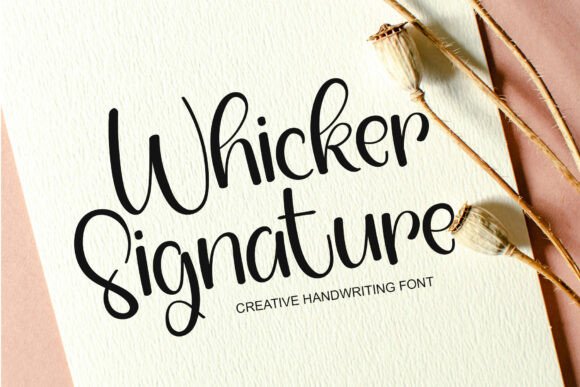
Whicker Signature Font Review
As a web designer, I often find myself searching for the perfect typeface to bring a project to life. Recently, I tested Whicker Signature on a new online store layout and was immediately drawn to its warmth and character. This font feels like a personal touch in a digital world, making it ideal for creative brands looking to stand out.
A Warm Touch for Digital Branding
Whicker Signature has a soft, handwritten quality that adds personality to any design. It’s not overly ornate, but it carries a friendly energy that works well for boutique shops, creative portfolios, or personal blogs. The subtle swashes and consistent stroke weights make it feel both modern and approachable.
I used it for a hero section on a new client’s website, where it served as the main headline. The font’s legibility at larger sizes was impressive, and it paired beautifully with a clean sans serif for the body text. The contrast between the two made the design feel balanced and professional without losing its handmade charm.
Perfect for Web Headers and CTA Buttons
One of the strongest uses for Whicker Signature is in headers and call-to-action buttons. Its fluid curves and gentle weight make it a great choice for headlines that need to grab attention without overwhelming the user. I found it particularly effective when placed over image banners or background gradients, where it added visual interest without competing with the content.
On mobile devices, the font maintained its clarity and readability, which is crucial for responsive web design. I also tested it on smaller buttons and found it worked well as long as the size wasn’t too small. For best results, I recommend using it for short phrases rather than long blocks of text.
Pairing Tips for Web Design
When working with Whicker Signature, it’s important to consider how it interacts with other fonts. I found that pairing it with a simple sans serif or a classic serif created a nice contrast while keeping the design cohesive. This combination works especially well for landing pages, blog headers, or portfolio sites where you want to highlight key messages without distracting the viewer.
For more editorial-style designs, pairing it with a serif font can add depth and sophistication. However, if the goal is a more minimal or tech-forward look, a clean sans serif will keep things modern and easy to read.
Usability on Different Backgrounds
Testing Whicker Signature on various backgrounds showed its versatility. On light backgrounds, it looked crisp and clear, while on dark backgrounds, it still held up well—though I noticed a slight decrease in legibility at smaller sizes. When placed over images or gradients, the font stood out without becoming lost in the design.
It also performed well on social media graphics and email templates, where it added a personal touch without being too busy. For these uses, I recommend keeping the text short and the size large enough to ensure readability across all devices.
Considerations for Web Use
While Whicker Signature is excellent for display purposes, it’s not ideal for long paragraphs or dense content. Using it for body copy would likely reduce readability, especially on smaller screens. It’s best reserved for headings, logos, and short phrases that need to convey emotion or personality.
Before integrating it into a project, I always check for webfont availability and file formats. Whicker Signature offers multiple weights and styles, which makes it easier to use in different parts of a site. It also includes alternates and ligatures that can be useful for customizing the look of your design.
For commercial use, it’s important to verify the licensing terms, especially if you’re designing for clients or selling digital products. The font should be properly licensed to avoid any legal issues down the line.
Final Thoughts on Whicker Signature
Whicker Signature is a standout font for web designers who want to add a personal, creative flair to their projects. Its friendly yet refined style makes it perfect for headers, buttons, and decorative elements, while its clean structure ensures it remains readable in most contexts.
If you're looking for a font that brings warmth and character to your digital work, Whicker Signature is definitely worth considering. Whether you're building a new website, redesigning a brand, or creating a landing page, this font can help elevate your design with its unique personality and practical usability.